wǒ de - tú piàn总帮助
目录
·yī zì tōng tú piàn xì tǒng Pass the word Picture System·tú piàn de zhàn wài liàn jiē Outside the station image links·rú hé shàng chuán běn dì tú piàn How to upload local images
·rú hé shàng chuán xiāng guān tú piàn How to upload an image·rú hé chuàng jiàn shǔ yú zì jǐ de xīn de gè rén tú piàn zǔ hé How to create your own personal picture of the new combination·huàn dēng piàn Slide
yī zì tōng tú piàn xì tǒng Pass the word Picture System
  tú piàn shì yī zì tōng xì tǒng de yī gè yòu jī zǔ chéng bù fēn, qiàrúqífèn de yìng yòng, huì gěi nèi róng zēng tiān yì cǎi。
  
   tú piàn yǐ fù yú nèi róng。 mù qián, yōng yòu tú piàn de nèi róng yòu: rén wù, wén jí, cháo zhèng, guó dù, zuò pǐn, shī cí, cí tiáo, chéng yǔ, shì jiàn, yīnyuè hègē qū, gòng xiǎng zuò pǐn, gòng xiǎng shī cí hé bāng zhù děng 13 gè fāng miàn。
  
   yī zhāng huò yī zǔ tú piàn, tōng guò yǔ yī gè jù tǐ de rén wù, zuò pǐn, zhāng jié huò duàn luò nèi róng xiāng lián, gòu chéng yī gè zǔ hé。 tóng zǔ tú piàn tōng guò qí zhōng de yī zhāng zhù yào tú piàn, hé yī gè gù dìng de nèi róng jǐn mì jié hé。 dǎ kāi tóng zǔ tú piàn qián, zhǐ xiǎn shì tóng zǔ tú piàn zhōng de dì yī zhāng tú piàn。
  
   yī gè huò duō gè tú piàn zǔ hé, tōng guò tè dìng de guān xì, gòu chéng yī gè xiāng guān tú piàn jí hé。 bǐ rú cí tiáo “ zhōng guó ”, kě yǐ tóng shí shì guó jiā hé mǒu gè lèi xíng de zuò pǐn de tí mù, xiāng yìng de tú piàn zǔ hé nèi de suǒ yòu tú piàn, biàn xíng chéng liǎo yī zhǒng“ xiāng guān tú piàn” de lián xì。
  
   tú piàn yóu yòng hù shàng chuán。 yòng hù kě yǐ xuǎn cài dān“ wǒ de yī zì tōng” xià de“ tú piàn” tiáo mù, lái chá kàn zì jǐ shàng chuán de suǒ yòu tú piàn。
  
   diǎn jī chū xiàn yú nèi róng zhōng de tú piàn, kě yǐ chá kàn gāi tú piàn de xiáng xì nèi róng, bāo kuò tú piàn míng chēng、 tú piàn miáo shù、 zī liào lái yuán、 xiāng guān nèi róng、 tóng zǔ tú piàn、 xiāng guān tú piàn、 gòng xiàn zhě。
  
   dāng tóng shí xiǎn shì de tú piàn duō yú 2 zhāng shí, kě yǐ jìn xíng huàn dēng piàn de zì dòng xiǎn shì。
  
   nín kě yǐ cǎi yòng liǎng zhǒng fāng shì lái shàng chuán tú piàn :
  1、 jiāng tú piàn de zhàn wài liàn jiē zhí jiē kǎo bèi dào dāng qián biān ji yè miàn de“ tú piàn :” dān xíng wén běn kuàng;
  2、 huò zhě xiān jiāng běn dì tú piàn shàng chuán dào běn wǎng zhàn, xì tǒng jiāng huì zì dòng jiāng tú piàn de liàn jiē fàng rù dāng qián biān ji yè miàn de“ tú piàn :” dān xíng wén běn kuàng。


  Pass the word picture is an integral part of the system, just the right applications, the content will add color.
  Picture attached to the content. Currently, with the image content: People, Collected Works, affairs of state, country, work, poetry, term, phrase, events, music and songs, sharing work, sharing poetry and help to the 13 aspects.
  One or a group of pictures, with a specific character, work, the content of linked chapters or paragraphs to form a combination. With a group of pictures by one of the main picture, and a fixed content closely. Open the picture with the group before, only shows the first film with Photo Images.
  When the pictures also showed more than two hours, can be automated slide show.
  You can upload pictures in two ways:
  1, the image of off-site links directly to the current editorial page copy of "Image:" single-line text box;
tú piàn de zhàn wài liàn jiē Outside the station image links
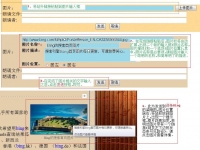
图片上传说明示意图
  tiān jiā tú piàn, kě yǐ zài wén zhāng zhōng diǎn jī“ shàng chuán tú piàn”, yě kě zài“ wǒ de yī zì tōng -- tú piàn” zhōng tiān jiā。
  
   tú piàn de zhàn wài liàn jiē, zhǐ de shì tú piàn de wǎng yè lù jìng, bǐ rú: http://maplereview.net/images/logo2.gif
  
   tōng cháng, nín kě yǐ jiāng shǔ biāo fàng dào tú piàn shàng, diǎn yòu jiàn, xuǎn CopyShortcut, CopyImageLocation, huò zhě, xuǎn Properties, jí kě fù zhì tú piàn dì zhǐ Address(URL)。
  
   rán hòu, jiāng tú piàn de zhàn wài liàn jiē, zhí jiē shū rù huò zhě kǎo bèi dào dāng qián biān ji yè miàn de“ tú piàn :” dān xíng wén běn kuàng( rú tú 1)。
  
   zhè shí, tú piàn míng chēng de dān xíng wén běn kuàng yǔ zhào piàn miáo shù de wén běn shū rù kuàng jiāng zì dòng chū xiàn, qǐng nín shū rù shǎo yú 20 gè zì de tú piàn míng chēng , hé jiǎn dān de miáo shù( rú tú 2)。
  
   zài wán chéng dāng qián biān ji yè miàn de wén zì shū rù zhī hòu, diǎn jī fā sòng huò zhě cún chǔ niǔ( rú tú 3), jí kě wán chéng( rú tú 4)。


  Add a picture, you can click on the article "Upload Picture", also available on the "My word pass - Pictures" added.
  Photo link outside the station, referring to the image path of the page, such as: http://maplereview.net/images/logo2.gif
  Usually, you can hover your mouse over the pictures, right click, select Copy Shortcut, Copy Image Location, or, choose Properties, you can copy the image address Address (URL).
  Then, the image of off-site link, or copy directly to the current editorial page of "Image:" single-line text box (Figure 1).
  Then, picture the name of the one-line text box with the photo description text input box will automatically appear, please enter the characters in the picture is less than 20 names, and brief description (Figure 2).
rú hé shàng chuán běn dì tú piàn How to upload local images
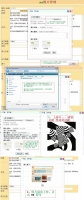
上传本地图片的示意图
  tiān jiā tú piàn, kě yǐ zài wén zhāng zhōng diǎn jī“ shàng chuán tú piàn”, yě kě zài“ wǒ de yī zì tōng -- tú piàn” zhōng tiān jiā。
  
  1、 zhǔn bèi gōng zuò
  
   shǒu xiān, zài wéi nín gǎn xīng qù de wén zhāng shàng chuán tú piàn zhī qián, nín xū yào shǒu xiān zhǔn bèi hǎo hé shì de tú piàn。 nín suǒ xuǎn zé de zhèng què、 qīng xī de tú piàn kě yǐ duì wén zhāng nèi róng qǐ dào yòu yì de bǔ chōng, bāng zhù měi yī wèi yuè dú zhě dōunéng gèng hǎo de lǐ jiě nín suǒ biān ji de nèi róng。
  
   qí cì, nín suǒ xuǎn zé de tú piàn zài zhèng wén zhōng suǒ chù de wèi zhì yě jiāng zhí jiē yǐng xiǎng dào wén běn de zhěng tǐ pái bǎn de měi guān, suǒ yǐ nín xū yào zài biān ji yè, tōng guò shū rù tí shì fú de wèi zhì lái xuǎn zé chā rù tú piàn de jù tǐ wèi zhì。
  
   zuì hòu, zuò hǎo yǐ shàng liǎng bù zhǔn bèi gōng zuò zhī hòu, nín jiù kě yǐ diǎn jī biān ji yè miàn de“ shàng chuán tú piàn” àn niǔ( rú tú 1), zhèng shì jìn rù shàng chuán bù zhòu
  
  2、 shàng chuán bù zhòu
  
   diǎn jī shàng chuán 'àn niǔ hòu, nín huì kàn dào yī gè fú dòng chuāng kǒu: dì yī bù, nín xū yào tōng guò“ Browse...” ( liú lǎn ) àn niǔ( rú tú 2) zài yìng pán zhòngxuǎn zé gāng cái zhǔn bèi hǎo de tú piàn, zhī chí de gé shì bāo kuò jpg、 gif、 png, tóng shí tú piàn de dà xiǎo qǐng bù yào chāo guò 3M( rú tú 3)。 jiàn yì nín shàng chuán cháng kuān bǐ lì xiāng jìn de tú piàn, zhè yàng huì dé dào zuì hǎo de xiǎn shì xiào guǒ。
  
   wèile shǐ nín de wén zhāng zài tú wén bìng mào de tóng shí duì liú lǎn zhě qǐ dào gèng dà bāng zhù, qǐng nín tián xiě bì yào de shuō míng wén zì, qǐng bǎo zhèng wén zì zhèng què( rú tú 4)。
  
   wán chéng yǐ shàng liǎng bù zhī hòu, nín kě yǐ xuǎn zé tú piàn zài zhèng wén suǒ xiǎn shì de jù tǐ wèi zhì, diǎn jī shì yì tú huò xuǎn zé 'àn niǔ( rú tú 4) jūn kě yǐ xiū gǎi jù tǐ de jū zuǒ / jū yòu xuǎn xiàng, zuì hòu, diǎn jī“ kāi shǐ shàng chuán” àn niǔ( rú tú 4), chuāng kǒu biàn huà( rú tú 5)、 shàng chuán wán bì hòu, tú piàn jiǎn suō tú , jiāng xiǎn shì zài duì huà kuàng nèi , diǎn jī Ok, jí kě cāo zuò wán bì( rú tú 5)。


  Add a picture, you can click on the article "Upload Picture", also available on the "My word pass - Pictures" added.
  1, preparation
  First, the article you are interested in to upload pictures, you need to first prepare the appropriate image. Your choice Di correct, clear images can play a useful supplementary article content, Bang Zhu Zhe can better read every one of 理解 you to edit content.
  Second, your choice of picture location in the text also will directly affect the overall layout of the beautiful text, so you need to edit the page by typing prompt to select the location of the specific location insert the picture.
  
  2, loading step
  Click the Upload button, you will see a floating window: the first step, you need to "Browse ..."( browse) button (Figure 2) Select the hard disk images have just prepared, supported formats include jpg , gif, png, while the size of the picture, do not exceed 3M (Figure 3). Recommend that you upload a picture aspect ratio similar to this would be the best display.
  To make your article illustrated the same time, viewers play a greater help, please fill out the necessary explanatory text, please ensure that the correct text (Figure 4).
  Completed these two steps, you can select the picture shown in the specific location of the body, click on diagram or select the button (Figure 4) can modify the particular home left / right hand side option, and finally, click the "Start Upload" button ( Figure 4), the window changes (Figure 5), after uploading, Jane thumbnail image will appear in the dialog box, click Ok, you can complete operation (Figure 5).
rú hé shàng chuán xiāng guān tú piàn How to upload an image
  zuò pǐn de yī gè zhāng jié, huò cí tiáo de yī gè duàn luò de shuō míng nèi róng, zhǐ néng xiǎn shì yī zhāng tú piàn。
   zhè yàng de yī zhāng tú piàn, kě yǐ hé duō zhāng qí tā tú piàn yī qǐ, zǔ chéng yī gè tú piàn zǔ hé。
  
   yòu liǎng zhǒng bàn fǎ jiàn lì“ tú piàn zǔ hé”:
  
  1、 zài nèi róng biān ji yè miàn nèi, chóngfù shàng chuán duō zhāng tú piàn, qí jiēguǒ shì: zuì hòu de nà yī zhāng tú piàn, jiāng shì gāi zhāng jié nèi róng de xiǎn shì tú piàn, ér zhè xiē tú piàn zhī jiān, zé gòu chéng liǎo yī gè tú piàn zǔ hé。 diǎn jī gāi zhāng jié nèi róng zhōng de jiǎn suō tú, jí kě chá kàn dào gāi xiāng guān tú piàn zǔ hé zhōng de suǒ yòu tú piàn;
  
  2、 zài diǎn jī jiǎn suō tú, zhuǎn rù tú piàn yè miàn, yǐ cì pàn duàn: rú guǒ tā yòu tóng zǔ tú piàn, zé xiǎn shì tóng zǔ tú piàn; fǒu zé, rú guǒ yòu xiāng guān tú piàn, zé xiǎn shì xiāng guān tú piàn; rú guǒ yòu tóng lèi xíng de tú piàn, zé xiǎn shì tóng lèi xíng tú piàn; rú guǒ yòu gòng xiàn zhě, zé xiǎn shì gòng xiàn zhě de tú piàn jí; rú guǒ zì jǐ yòu tú piàn, zé xiǎn shì yòng hù zì jǐ de tú piàn jí hé; zuì hòu, rú guǒ qián miàn de tiáo jiàn dōubù fú hé, zé xiǎn shì xì tǒng quē shěng tú kù: shì jiàn tú piàn jí。


  Such a picture can be more than other images together to form a picture portfolio.
  There are two ways to establish a "Photo Portfolio":
  1, the content editing page, the repeat upload multiple images, the result is: is the last picture, will display the contents of the section image, and between these pictures, you form a picture portfolio. Click on the chapters of Jane thumbnail pictures can look to the combination of all the relevant images;
  2, simple click on thumbnail image into the page, turn to judge: if it had the same group of pictures, it shows the same group of pictures; Otherwise, if the associated image, then display the relevant image; if the same type of picture, it shows the same type of image; if contributors contributors images are displayed; if they have pictures, it shows the user's own photo collection; Finally, if the preceding conditions are not met, the display system default Gallery: Event Photo Gallery .
rú hé chuàng jiàn shǔ yú zì jǐ de xīn de gè rén tú piàn zǔ hé How to create your own personal picture of the new combination
  běn xì tǒng de tú piàn zǒng shì yǐ zǔ hé de xíng shì jiàn lì tú piàn zhī jiān de lián xì . gè rén kě yǐ jiàn lì shǔ yú zì jǐ de tú piàn zǔ hé .
  
   chuàng jiàn fāng fǎ
  1. běn dì shàng chuán de bàn fǎ : diǎn jī " shàng chuán tú piàn "; xuǎn zé " chuàng jiàn gè rén tú zǔ "( dǎ gòu ); wán chéng xiāng guān cāo zuò , jí kě ;
  2. zhàn wài tú piàn : cóng yè shǒu de " wǒ de yī zì tōng ", xuǎn " tú piàn " cài dān ; zài tú piàn de dān xíng wén běn kuàng , fàng rù nín de tú piàn liàn jiē (http://.....jpg/gif/png/bmp); xuǎn zé " chuàng jiàn gè rén tú zǔ "( dǎ gòu ); wán chéng xiāng guān cāo zuò , jí kě .


  The system's picture is always in the form of combination to establish the link between images. Individuals can create their own picture combinations.
  Create method
  1. Local upload way: click on "Upload picture"; select "Create a personal plan group" (tick); complete the relevant operation, you can;
huàn dēng piàn Slide
  duō zhāng tú piàn lián xù fàng dà xiǎn shì shí, kě yòng huàn dēng piàn zì dòng xiǎn shì。
   tú piàn xià fāng yòu sān gè tú biāo。 zhōng jiān wéi“ fàng” hé“ tíng”; yòu wéi kuài jìn, zuǒ wéi fǎn fāng xiàng kuài jìn; lián xù diǎn jī zuǒ huò yòu tú biāo kě diào jié bō fàng sù dù。
   fǎn huí qián yè, diǎn jī huà miàn huò huà miàn xià fāng de miáo shù。


  Continuous zoom display multiple images when the slides are available automatically.
  There are three icons below the picture. The middle for the "release" and "stop"; the right to fast forward, fast forward left for the opposite direction; consecutive left or right click the icon to adjust the playback speed.
  Back to previous page, click on the screen or the bottom of the screen description.